Chat with your own agents
Drives the Claude Code, Codex, Antigravity or OpenCode installed on your machine, with your settings, your CLAUDE.md and your hooks. Open several new sessions at once, and let one agent hand a task to another.
A desktop app that runs Claude Code, Codex, Antigravity and others with the plan you already pay for. Watch each agent work, review what it changed and pick up from any computer.
7 days free, no card. Then US$ 19, once. Linux, Windows (with WSL) and Mac with Apple silicon, in testing.
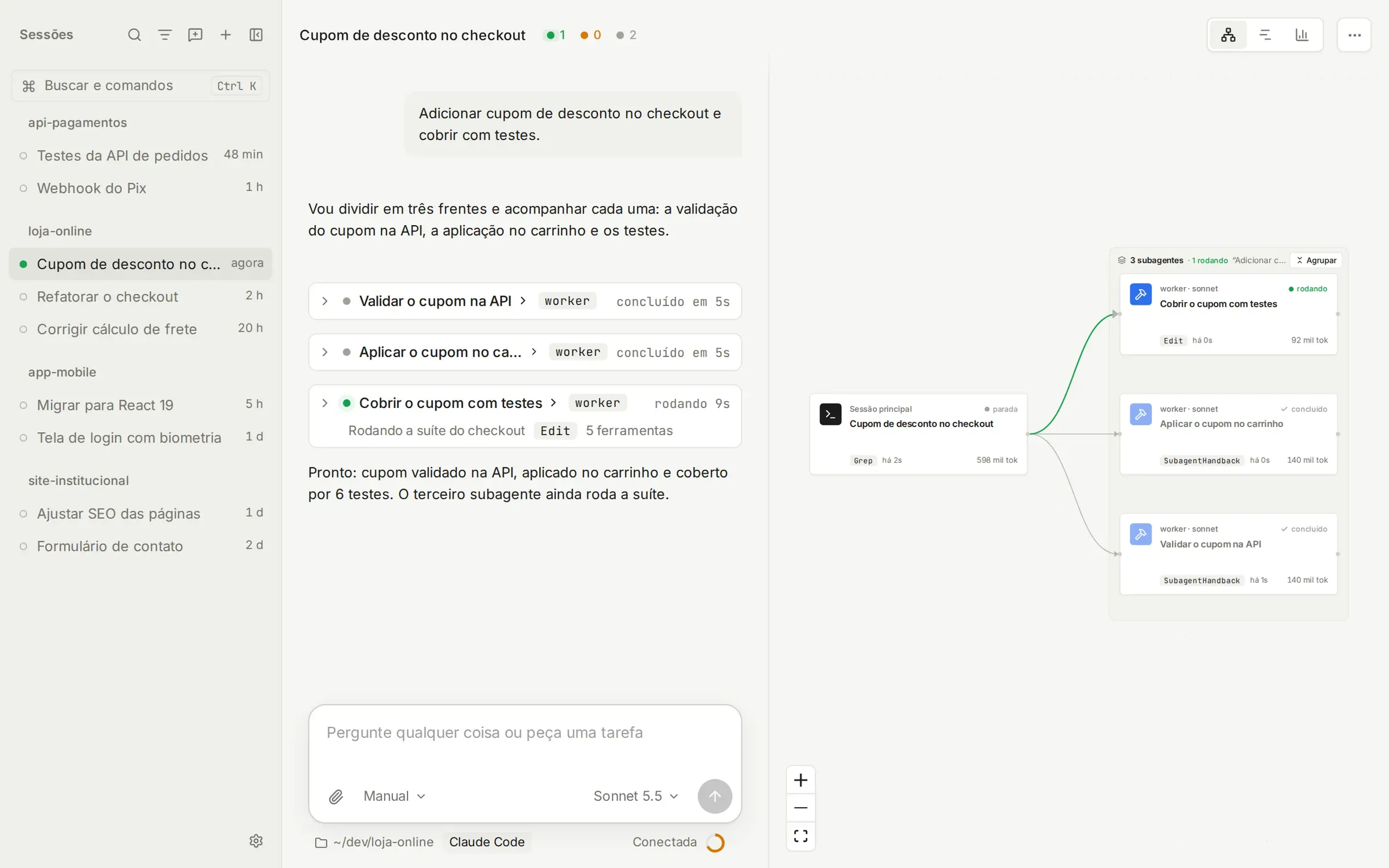
The app in use: a new session, three subagents at work, the result in the chat.
No API key and no new account: Ramo runs the agents installed on your computer, with your own login.
I'd launch three subagents and lose track of what each one was doing. With Ramo I see everything in the graph and know right away which one got stuck.
Ramo is a desktop app that reads the sessions Claude Code writes to ~/.claude and draws each one as a live graph: the main conversation in the center, its subagents around it, with status, last tool, tokens and estimated cost. Next to it, a chat drives the Claude Code, Codex, Antigravity or OpenCode already installed on your machine, with your login, your settings, your CLAUDE.md and your hooks, and one agent can hand a task to another.
Around the session: the GitHub issues and pull requests of your folders, your plan usage and limits, your own widgets, a terminal, your files, the git diff and a browser. Everything runs on your computer, no sign-up. Your sessions and chats never go through our servers, except encrypted, when you use Ramo on one computer from another and they cannot connect directly.
Chat, graph, timeline, usage, GitHub and the Panel in one window. Open them side by side or one at a time and follow the session while it works.
Drives the Claude Code, Codex, Antigravity or OpenCode installed on your machine, with your settings, your CLAUDE.md and your hooks. Open several new sessions at once, and let one agent hand a task to another.
Every subagent with its status, last tool and report, in real time. Workflows with phases and several agents show up whole, with Codex alongside. Stop one, relaunch it with another model, or use its report as context.
Issues and pull requests of your folders, each one a session away. The PR screen shows checks, conversation and diff; review and merge there, or let the agent fix the checks and merge when everything passes. Several accounts, sign in with GitHub.
Small cards with numbers from outside Ramo: CI, tickets, uptime, orders, whatever you want. Ask the agent with /widget; nothing runs before you approve it.
Plan limits in rings, today and the last 7 days, trend, cost per model, month projection and peak hours, plus a context meter in every conversation.
All in the three-dot menu: a terminal in the session folder, your files, the git diff with comments that become instructions, and a browser for your localhost.
The AI's charts and mermaid diagrams are drawn right in the conversation, with the data as a table, copy and expand. The files it creates show up as cards.
Use the Ramo of another computer, a server or the work laptop, from here, with the same license. No network setup, and everything travels end-to-end encrypted.
Schedule a task for an agent, like reviewing what changed every Friday, and look at the result when it suits you.
It finds the sessions Claude Code already saves on your computer, no setup needed. Codex, Antigravity and OpenCode too.
Or start new ones in any folder, with the agent, model and permission mode you want, several at once.
Chat on one side, subagents on the other, with GitHub, usage and your widgets a click away.
One-time payment. No subscription.
Try it free for 7 days first, no credit card.
Card payment through Stripe. You have 7 days to change your mind and get your money back (refunds). By buying, you accept the terms of use.
On a Mac? Ramo for Apple silicon is in testing on the download page
Ramo for your whole team: one key per person, and a license manager to keep track of every computer.
Price and number of seats are agreed with us directly, for teams of any size. Write to suporte@useramo.app.
Yes. Ramo opens the Claude Code, Codex and Antigravity already installed on your computer, with your own login, so you pay nothing extra to Anthropic, OpenAI or Google. No API key and no new account.
Open Ramo and pick the session from the list. Ramo shows every subagent the session launched in a live graph, with its status (running, stopped or done), last tool used, tokens and the report it returned.
Yes, to chat with Claude Code: Ramo uses the one already installed on your machine, with its login and settings. The same goes for Codex, Antigravity and OpenCode: Ramo uses the ones you have installed, and in each new session you pick who answers.
Yes. Besides Claude Code, Ramo runs Codex, Antigravity, OpenCode and other agents you add in Settings, each with its own models and modes. Sessions you open in the terminal show up in the sidebar and in the graph. An agent can also hand a task to another one (Claude asks Codex, for instance): the task shows in the graph and the result comes back to the conversation.
Ramo lists the open issues and pull requests of the repositories in your folders, and the ones that involve you. Any of them can become a new session with the request already written. A pull request opens inside Ramo with its checks, conversation and diff: you can comment, review and merge there, or let the agent fix the checks and handle the reviews, and Ramo merges when everything passes. Sign in with GitHub inside Ramo, or use the GitHub login already on your computer, with several accounts.
Small cards with information from outside Ramo: CI, tickets, uptime, orders, your time clock, anything that answers JSON or comes from a command. They stay in view in the footer and gather in the Panel. Ask the agent with /widget or create one in Settings; nothing runs before you see and approve it, and API keys are stored apart, never shown.
Yes. Download Ramo and use it free for 7 days, with everything unlocked and no credit card. After the trial, Ramo asks for a license key to keep going.
Yes. A Ramo license costs US$ 19, as a one-time payment with no subscription. It works on up to 2 computers at the same time and includes updates. To replace one of them, deactivate it on the old one and activate it on the new one.
When the 7-day trial ends, Ramo shows the activation screen. Paste the key you received there, in the RAMO-XXXX-XXXX-XXXX-XXXX format, and Ramo picks up where you left off.
Because the installer is not signed yet, so Windows has no reputation for it. In the SmartScreen window, click More info and then Run anyway. It happens once, and Ramo installs for your user only, without admin rights.
Yes. Install Ramo for Windows: on first launch it finds the Claude Code in your WSL distro, sets the distro up once and then uses the sessions there. You can switch between the Windows and the WSL Claude Code in the sidebar footer.
Yes. Sessions open in the terminal show up live in Ramo's graph. To keep two conversations from mixing in the same history, Ramo's chat stays read-only while the session is open somewhere else.
Not necessarily. Ramo estimates cost from each model's API pricing, which is useful for comparing sessions and days. On a subscription plan you don't pay per token.
No. Ramo runs on your computer and reads the files Claude Code already writes to disk. Your sessions, chats and code never go through our servers, except when you use Ramo on one computer from another and they cannot connect directly: then they go through the Ramo relay server, encrypted, and it cannot read the content. Ramo talks to our servers to check your license and, with a paid license, so your computers can find each other. Chat messages go out through Claude Code, just as they would from the terminal, and GitHub is reached straight from your computer, with your own token.
No. Ramo is not an Anthropic product. Claude and Claude Code are trademarks of Anthropic.
Yes. Ramo for Linux and Windows can be downloaded at useramo.app/en/download, with a 7-day free trial, and licenses are on sale now. Ramo for Mac with Apple silicon is on the same page, in testing: on first launch, allow it in System Settings > Privacy & Security > Open Anyway.
Your key shows up on screen right after payment, with a button to copy it. If you lose it, email suporte@useramo.app from the address you used to buy.
Download it and use it free for 7 days, no credit card. Then a lifetime license for US$ 19, one-time payment.