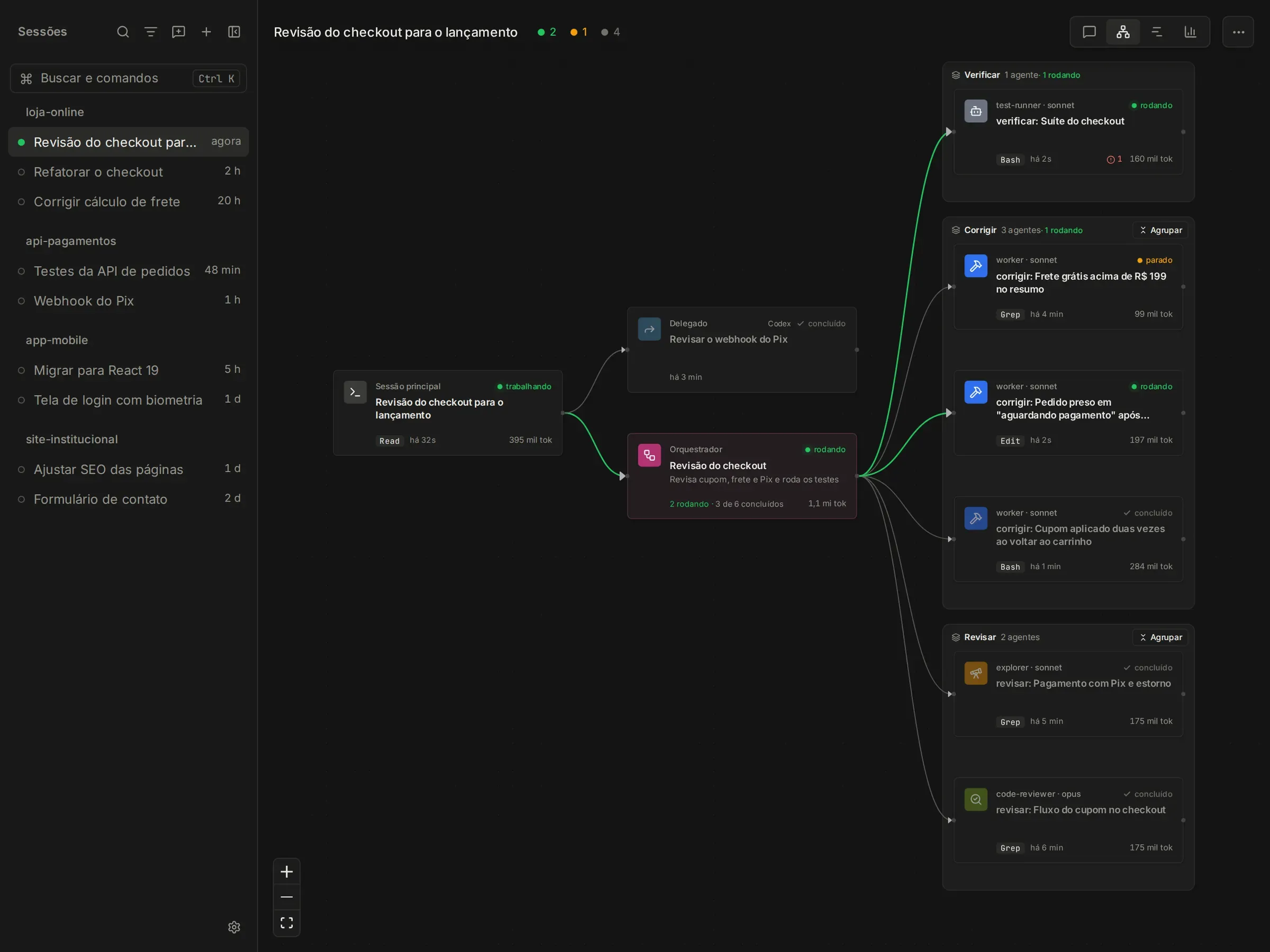
When a task gets big, Claude Code can split up the work: it calls one subagent to review the code, another to find where a function is used, and another to run the tests. Each one works on its own and hands its result back to the main conversation.
That makes Claude Code faster and more organized, but it creates a new problem: knowing what is going on. This guide explains what subagents are, when they are worth using, how to create your own, and how to keep track of each one while the session runs.
What a subagent is in Claude Code
A subagent is a specialized assistant that the main conversation calls to handle part of the work. Three traits make a difference day to day:
- Its own context. A subagent starts with a clean context window. Everything it reads and tries stays with it, and the main conversation only gets a summary of what was done.
- Its own instructions. Each subagent can have a defined role, such as reviewer, investigator or testing specialist, with the rules for that role.
- Its own tools and model. You can limit what it is allowed to use (read-only access to files, for example) and pick a different model from the one the main conversation uses.
Claude Code calls subagents on its own when one’s description matches the task, or when you ask directly: “use the reviewer to look at these changes.”
When subagents are worth using
Subagents work best on tasks that can be broken into independent pieces. Some common examples:
- Exploring a large codebase, with one subagent per folder or module.
- Reviewing a change from different angles: one looks for bugs, another for security issues, another for performance.
- Running tests and analyzing failures without flooding the main conversation with terminal output.
- Researching documentation while the main conversation keeps implementing.
For small tasks, a single conversation is usually faster. Each subagent reads files and runs tools on its own, so splitting things up too much also eats into your plan.
How to create a subagent
A subagent is a Markdown file with a configuration header. Project subagents live in .claude/agents/ inside the repository and can be committed to git so the whole team can use them. Your personal ones, which work in any project, live in ~/.claude/agents/.
A simple code reviewer looks like this:
---
name: reviewer
description: Reviews changed code looking for bugs. Use after large changes.
tools: Read, Grep, Glob
model: sonnet
---

You review code. Read the changes, point out bugs with the file and line,
explain why each one is a problem, and suggest a fix. Do not edit files.
The fields that matter most:
- name: the name you use to call the subagent.
- description: this is what Claude Code uses to decide when to call the subagent on its own. The clearer it is, the more often it gets it right.
- tools: the tools it is allowed to use. A reviewer that only reads does not need to edit files.
- model: the subagent’s model. A lighter model is usually enough for searching and reading.
You can also create and edit subagents with the /agents command inside Claude Code, which lists both the project ones and your own.
Why it gets hard to follow in the terminal
With one subagent, the terminal is enough. With three or four running at the same time, the questions start:
- Which one is still running and which one has finished?
- Is any of them stuck waiting for a permission?
- What did each one read, change and answer?
- How much has that session used so far?
Claude Code writes all of this to files on your computer, inside ~/.claude. The information is there, but it is scattered, and reading those files by hand in the middle of a task is not practical.
How to watch Claude Code subagents live
Ramo is a desktop app that reads those files and builds a live graph of each session. The main conversation sits in the center and each subagent appears connected to it, with:
- status: running, stopped or done;
- the last tool used, so you know what it is doing right now;
- tokens and estimated cost for each one;
- the report it returned, which you can open or use as context in another conversation.
Larger flows, with phases and several agents, show up in full on the graph. If a subagent gets stuck or goes down the wrong path, you can stop it or relaunch it with a different model. Next to the graph is the chat, which uses the Claude Code already installed on your machine, with your login, your CLAUDE.md and your hooks.
Sessions opened in the terminal also show up on the graph while they run, so you do not have to change how you work to start seeing what your subagents are doing. Everything runs on your computer: your conversations do not go through Ramo’s servers, except when you use Ramo from another computer and the direct connection between the two cannot be made: then they go through Ramo’s relay server, encrypted, and it cannot read them.
Best practices for subagents
- Write specific descriptions. “Reviews changes to TypeScript files looking for bugs” works better than “helps with code.”
- Give it only the tools it needs. A research subagent does not need to edit files, and that avoids surprises.
- Ask for a short report. The summary goes back to the main conversation and takes up its context. Tell the subagent to return only what matters.
- Split by independent tasks. Two subagents editing the same file at the same time tend to get in each other’s way.
- Keep an eye on usage. Several subagents in parallel speed up the work, but they also reach your plan limit faster.
Want to see your subagents at work? Ramo has a 7-day free trial, no credit card required: download it here.