Few things are more disruptive than Claude Code stopping in the middle of a refactor because your plan limit ran out. The task is left half done, the context is lost, and you are not quite sure how long you will have to wait.
The good news is that you can see the limit coming and work in a way that makes your plan go further. This guide explains how the limits work, where to track your usage, and what to do when you run out.
How Claude Code limits work
You can use Claude Code in two ways, and each one has different rules:
- Subscription plan (such as Pro and Max): you pay a monthly fee and get a usage allowance. The allowance renews in time windows, one lasting a few hours and another weekly. When you reach the end of one, Claude Code tells you and says when you can continue.
- API: you pay per token used, with no fixed allowance. Here, the limit is your budget.
In both cases, what drives usage is the same: how many tokens each conversation reads and writes. Large files, long terminal output, conversations that drag on for hours, and several subagents in parallel all make usage climb faster.
Where to track usage in Claude Code itself
Claude Code has a few commands that help you see where you stand:
/usageshows how much of your plan you have used in the current windows./contextshows how much of the conversation’s context window is full, and with what./compactsummarizes the conversation so far to free up context without losing the thread of the task.
These commands answer “where am I right now?” well. What they do not show easily is the history: how much you used today compared with yesterday, which model weighs the most, what time of day you usually hit the limit, or whether your current pace will last until the end of the week.
How to see usage for every session in one place
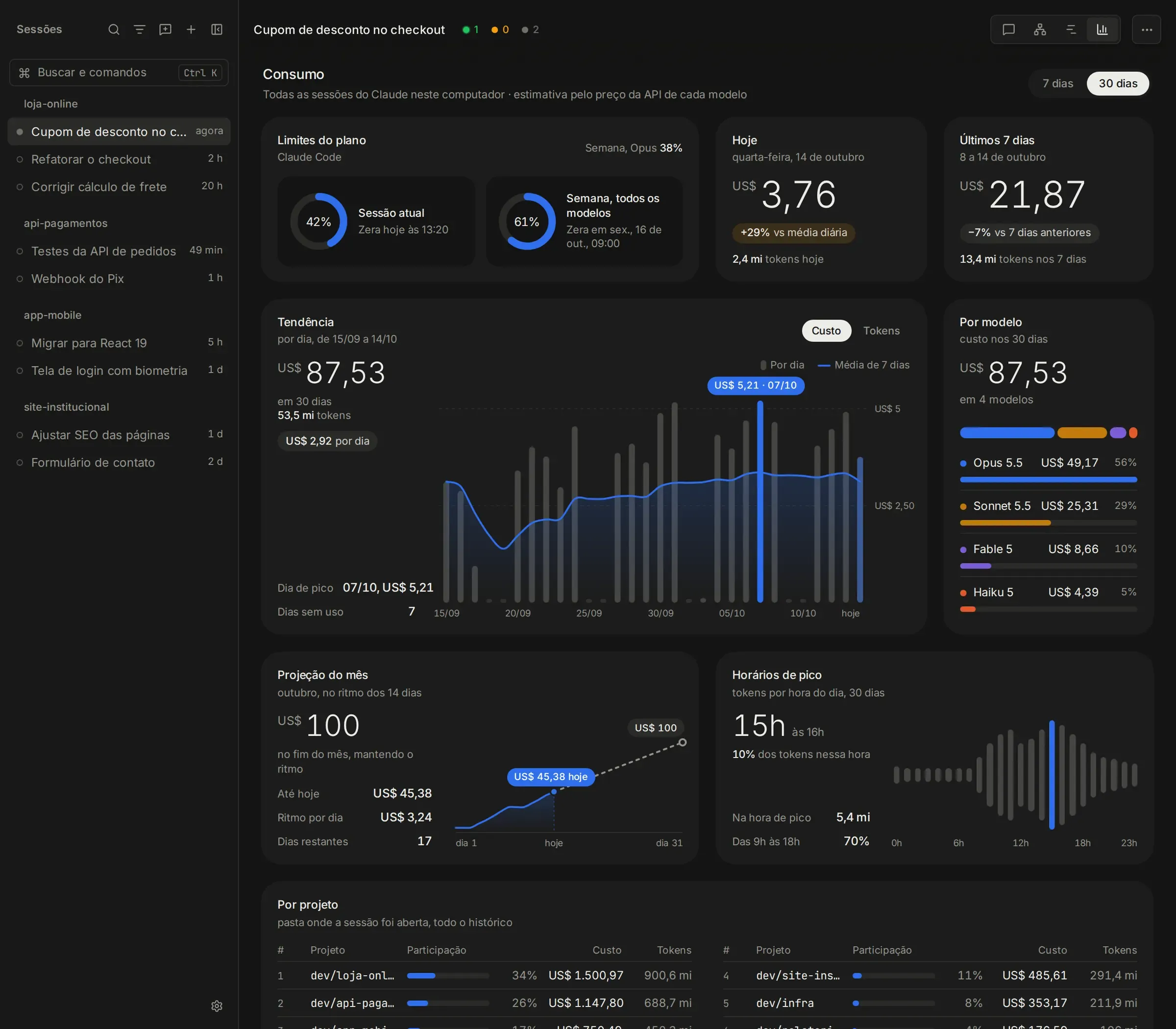
Ramo is a desktop app that reads the files Claude Code writes to your computer and builds a Usage screen with:
- your plan limits as rings, so you can see at a glance how much is left in each window;
- today and the last 7 days, with the trend compared with your average;
- cost per model, so you know whether the larger model is the one eating your plan;
- the monthly projection and your peak hours;
- a context meter in each conversation, which tells you when it is time to compact or start a new conversation.
The cost Ramo shows is estimated from each model’s API pricing. If you use the API, it is a good approximation of your bill. If you are on a subscription, it helps you compare sessions and days and find out what is weighing the most, since on a plan you do not pay per token.
The screen also adds up usage from Codex and Google Antigravity, for anyone who works with more than one agent. Everything is calculated on your computer: your conversations do not go through Ramo’s servers, except when you use Ramo from another computer and the direct connection between the two cannot be made: then they go through Ramo’s relay server, encrypted, and it cannot read them.
What to do when you hit the limit
If you have already hit the limit, you have three options:
- Wait for the window to renew. Claude Code tells you when you can continue. Use the time to review what has already been done.
- Continue with another agent. If you also use Codex or OpenCode, you can pick up the task there. Leave the conversation with a clear summary of what is left, so the next agent does not start from scratch.
- Switch accounts. If you have more than one Claude account, you can continue on the other one. In Ramo, you can add several accounts and turn on automatic switching: when one hits its limit, the next conversation continues on the next account.
How to make your plan go further
- Start new conversations for new tasks. A long conversation carries its whole history into every response. For a different topic, open a clean conversation.
- Compact before it fills up. Use
/compactwhen context is high, ideally at a point where the task has a natural pause. - Pick the model for the task. Searches, reads and simple changes rarely need the largest model.
- Watch out for huge outputs. Full logs and generated files fill up the context. Ask the agent to filter for what matters.
- Use subagents with judgment. They speed up work in parallel, but each one uses your plan on its own. Read more in Claude Code subagents.
- Look at the history, not just the moment. Knowing which days and times you usually hit the limit helps you plan your heavy tasks.
Want to see usage and limits for all your sessions on one screen? Ramo has a 7-day free trial, no credit card required: download it here.